
transform markdown to html in Svelte files via explicit tagged template

With a package manager of choice:
pnpm add -D svelte-md-templateAdd the vite plugin:
/// vite.config.js

import { defineConfig } from 'vite';
import { svelte } from '@sveltejs/vite-plugin-svelte';
import { svelteMdTemplate } from 'svelte-md-template';

export default defineConfig({
	plugins: [
		svelteMdTemplate({/* options */}),
		svelte(), // or import('@sveltejs/kit/vite').sveltekit
	],
});
Write content within the markdown tagged template:
<script>
	import { markdown } from 'svelte-md-template';

	const foo = 'bar';
</script>

{markdown`
# My Markdown Content

Variable can be injected as expected: ${foo}
All templates are merged, e.g. write [link-reference-definition] in one block and use in others.
`}

{markdown`
[link-reference-definition]: https://spec.commonmark.org/0.31.2/#link-reference-definition
`}
The intermediate Svelte code looks something like:
<script>
	const foo = 'bar';
</script>

<h1>My Markdown Content</h1>
<p>Variable can be injected as expected: {foo}</p>
<p>
	All instances are merged, e.g. write
	<a href="https://spec.commonmark.org/0.31.2/#link-reference-definition">
		link-reference-definition
	</a>
	in one block and use in others.
</p>See the blog post "Rethinking Markdown in Svelte" for more context.
When content only relies on basic syntax, e.g. CommonMark Specs, with little or no Svelte code, i recommend sticking to mdsvex or vite-plugin-svelte-md until you have an exact need that this package solves.
Markdown-to-HTML transformation may be customised using the transformer option
import { svelteMdTemplate } from 'svelte-md-template';

/// -------- Example --------
svelteMdTemplate({
	transformer: {/** see below */},
});

/// -------- API --------
import type { PluggableList, Processor } from 'unified';

interface SvelteMdTemplateOptions {
	transformer?: SvelteMdTemplateTransformer;
}

type SvelteMdTemplateTransformer =
	| SvelteMdTemplateTransformerUnifiedWithPlugins
	| SvelteMdTemplateTransformerUnified
	| SvelteMdTemplateTransformerCustom;

export type SvelteMdTemplateTransformerUnifiedWithPlugins = {
	type: 'unified';
	remarkPlugins?: PluggableList;
	rehypePlugins?: PluggableList;
};
export type SvelteMdTemplateTransformerUnified = {
	type: 'unified';
	processor: Processor<any, any, any, any, any>;
};
export type SvelteMdTemplateTransformerCustom = {
	type: 'custom';
	transform: (input: {
		/** array of markdown content as they appear from the original Svelte file in tagged templates */
		templates: string[];
		/** `id` from vite transform handler, often the path to current file, unless is a virtual file */
		id?: string;
	}) => string[] | Promise<string[]>;
};By default, svelteMdTemplate uses a minimal remark-rehype processor:
import { unified } from 'unified';
import remarkParse from 'remark-parse';
import remarkRehype from 'remark-rehype';
import rehypeStringify from 'rehype-stringify';

const processor = unified()
	.use(remarkParse)
	.use(remarkRehype, { allowDangerousHtml: true })
	.use(rehypeStringify, { allowDangerousHtml: true });
The processor is permissive, i.e allowDangerousHtml, for convenience. Security may not be a major concern here since
markdown content should be static at compile-time.
Some customisation recipes are listed in the next sub-sections.
Additional remark & rehype plugins can be added:
import { svelteMdTemplate } from 'svelte-md-template';

svelteMdTemplate({
	transformer: {
		type: 'unified',
		remarkPlugins: [/* ... */],
		rehypePlugins: [/* ... */],
	},
});
There is a definePlugin helper to provide typescript support for plugin options:
import { svelteMdTemplate } from 'svelte-md-template';
import { definePlugin } from 'svelte-md-template/unified';
import remarkEnhanceCodeblock from 'remark-enhance-codeblock';

svelteMdTemplate({
	transformer: {
		type: 'unified',
		remarkPlugins: [definePlugin(remarkEnhanceCodeblock, {/* typing is inferred */})],
	},
});A completely custom unified pipeline can be specified. This may be helpful to use a preset, pin specific versions, or when advanced options are necessary.
import { svelteMdTemplate } from 'svelte-md-template';
import { unified } from 'unified';

svelteMdTemplate({
	transformer: {
		type: 'unified',
		processor: unified().use(/* ... */), // specify a preset, for example
	},
});If a use case calls for a strategy other than unified, e.g markdown-it, provide a custom transformer:
import { svelteMdTemplate } from 'svelte-md-template';
import MarkdownIt from 'markdown-it';

svelteMdTemplate({
	transformer: {
		type: 'custom',
		transform: function ({ templates }) {
			const delimiter = '<!-- SVELTE_MD -->';
			const merged = templates.join(`\n\n${delimiter}\n\n`);
			const md = new MarkdownIt({ html: true });
			const transformed = md.render(merged);
			return transformed.split(delimiter);
		},
	},
});
Note that, the transform function:
- takes an array of strings via the
templatesproperty, each corresponding to amarkdown`...`template instance in the original Svelte file, and, - is expected to return an array of strings matching the aforementioned order.
By default, svelteMdTemplate should pick up the same files to-be-processed by svelte / sveltekit.
In the event it is necessary to explicitly define what to / not to process, specify include / exclude:
import { svelteMdTemplate } from 'svelte-md-template';

/// -------- Example --------
svelteMdTemplate({
	include: /\.md.svelte$/,
	exclude: /\.no-md\.svelte$/,
});

/// -------- API --------
type FilterIdSpecs = (string | RegExp)[] | string | RegExp;
interface SvelteMdTemplateOptions {
	include?: FilterIdSpecs;
	exclude?: FilterIdSpecs;
}The tag imports are stripped during the process, i.e:
<script>
	import { markdown } from 'svelte-md-template'; // <!-- to be removed automatically -->
</script>
When the package, i.e. svelte-md-template, is aliased to something else, this may not work as expected.
In such case, specify importSource:
import { svelteMdTemplate } from 'svelte-md-template';
import MarkdownIt from 'markdown-it';

svelteMdTemplate({
	importSource: 'alias-for-svelte-md-package',
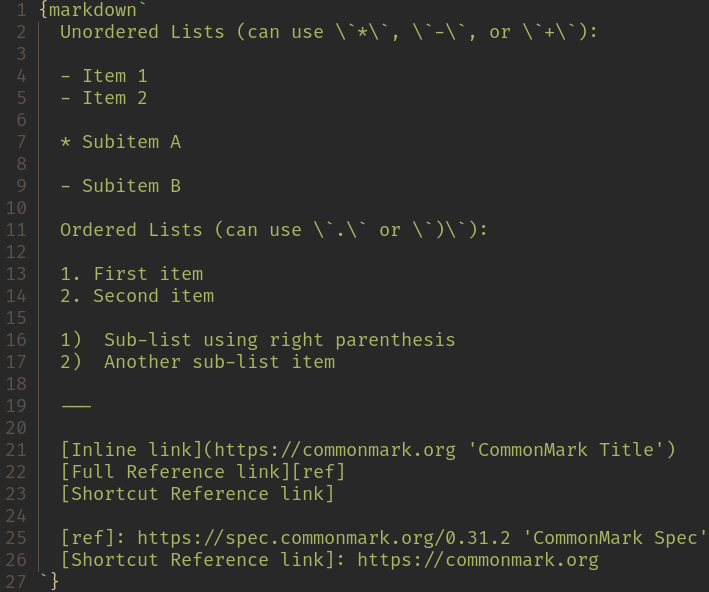
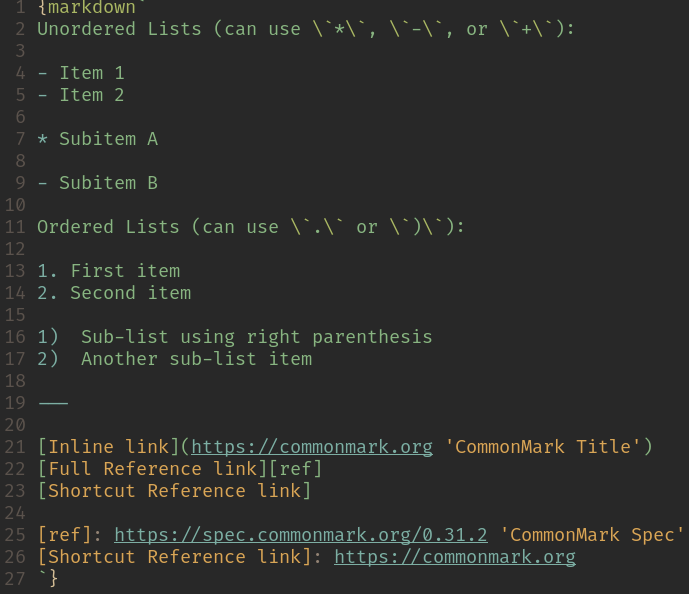
});It is probably a good idea to not indent your markdown content. This is to prevent language tool (i.e your LSP / syntax highlighting / editor setup) from mistakently parsing content as indended code block.
{markdown(\`
	Don't indent here
	as it will be parsed as
	an indented code block
\`)}
For example, here is a Neovim setup showing the difference between having indentation...
...and not having indentation:
In the event your editor setup is smart enough to strip indentation, or language tool is not a concern,
you can turn on the dedent option...
import { svelteMdTemplate } from 'svelte-md-template';
import MarkdownIt from 'markdown-it';

svelteMdTemplate({
	dedent: true,
});
...in which case indentation will be stripped automatically during transform.
Make sure necessary prettier plugins are installed:
pnpm add -D prettier-plugin-embed prettier-plugin-svelteConfigure prettier to format Markdown code inside Svelte files:
/// prettier.config.js

/** @type {import('prettier').Config} */
export default {
	/* your regular options here */
	plugins: ['prettier-plugin-embed', 'prettier-plugin-svelte'],
	overrides: [
		{
			files: '**/*.svelte',
			options: /** @satisfies {import('prettier-plugin-embed').PrettierPluginEmbedOptions} */ ({
				embeddedMarkdownTags: ['markdown'],
				noEmbeddedMultiLineIndentation: ['markdown'], // optional, see note below
			}),
		},
	],
};
If using an alias for the markdown template, adjust accordingly.
Note
noEmbeddedMultiLineIndentation is to avoid indenting the code inside markdown`...`,
which will be mistakenly picked up by syntax-highlight tooling as an indented code block.
See Stripping Indentation for more information.
Note
The usage is, by design, explicit and verbose.
The most common inconvenience is that backtick has to be escaped:
{markdown`
Backticks, e.g. \`inline code\`, need to be escaped
`}
For code blocks, use tidle, i.e ~, to avoid so:
{markdown`
~~~javascript
console.log('Hello, world!');
~~~
`}
Alternatively, content containing a lot of backticks can be written in some variable / other file and loaded in as needed. For example, using remark-codeblock-source to write code example in separate file:
{markdown`
~~~javascript src="fs:./examples/hello.js"

~~~
`}

{markdown`
~~~language src="github:account/:repo/:commit_or_branch/:filepath"

~~~
`}${...} is picked up as expected. For example, this input:
<script>
	const foo = 'bar';
</script>

{markdown`
foo is ${foo}
`}
...will be transformed to:
<script>
	const foo = 'bar';
</script>

<p>foo is {foo}</p>
If ${...} is meant to be rendered as is, escape as \${...}.
Similarly {...} will be escaped by default, otherwise it would be picked up as Svelte expression in the output. For example, this input:
{markdown`
{static} is not an expression
`}
...will be be transformed to:
<p>{static} is not an expression</p>Some remark plugins I wrote that may be helpful:
See CONTRIBUTING.md for contribution guidelines.