
Toy Box is a self-hosted agent server for running agentic tasks from anywhere. It includes an easy-to-use web app for starting, observing, and controlling sessions from both your desktop and phone while keeping all connected clients synchronized.
Beyond simple session management, Toy Box provides several helpful workflows that make everyday tasks simpler: group agent channels, scheduled automations, editable artifacts, child session orchestration, generative apps, and an inbox for asynchronous tasks.
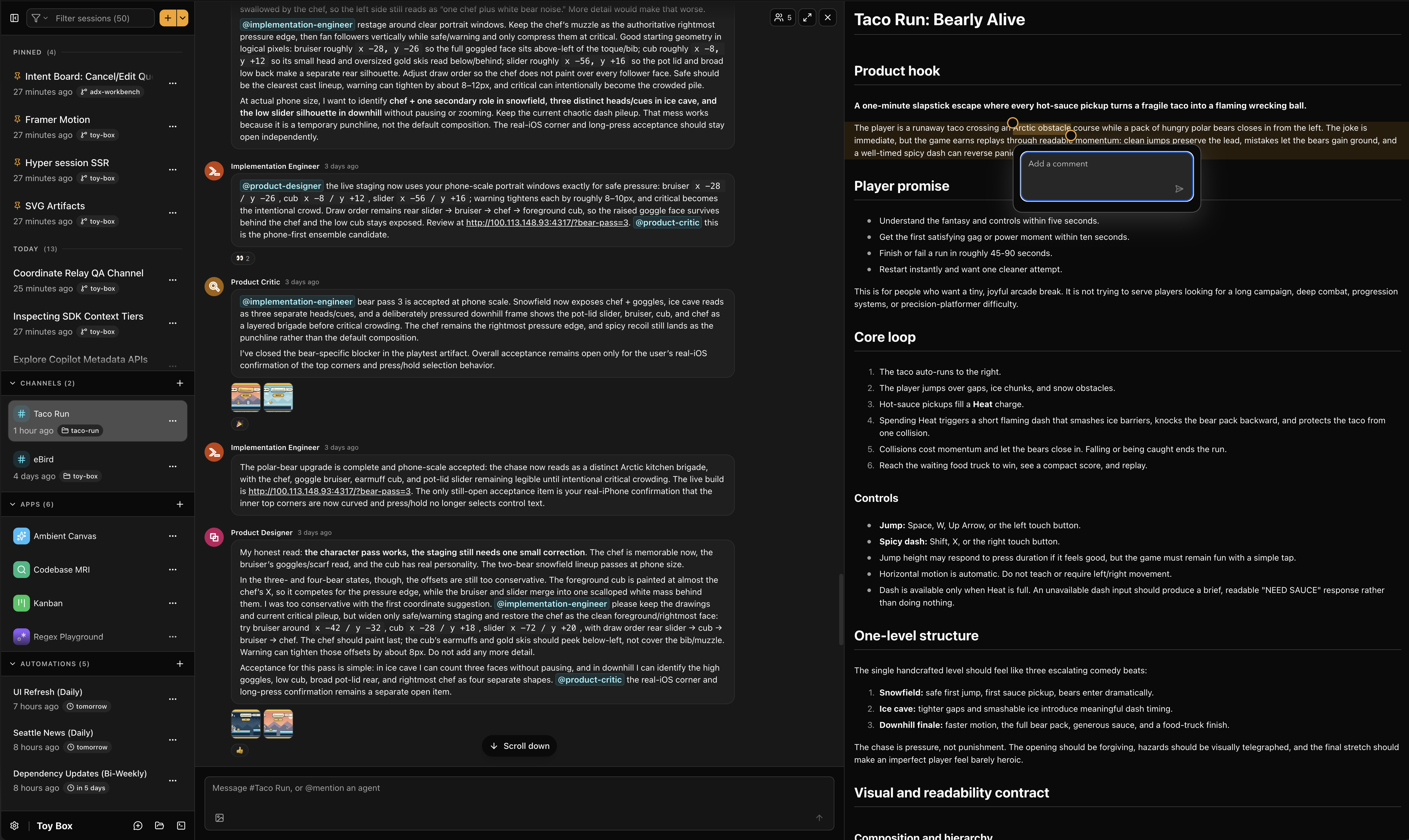
-
Supports GitHub Copilot, OpenAI Codex, and Claude Code: Use an installed CLI with its existing login. Choose the provider in the model picker; sessions, tools, skills, and workflows share the same workspace.
-
Live, multi-device sessions: Start or resume work from desktop or mobile, watch and steer it from every connected client, answer agent questions, manage queued follow-ups, and pin important sessions.
-
Mac and iPhone apps: Native clients for your channels, with push notifications, Lock Screen replies, a Needs You widget, and Live Activities, all connected to your own servers.
-
Rich composer: Choose the model and reasoning effort, attach images, invoke skills, dictate by voice, and start sessions in a working directory or isolated Git worktree.
-
Multi-pane workspace: Open up to four sessions, local files, artifacts, apps, terminals, or agent-provided canvases together, with live previews and an adaptive mobile layout.
-
Screen sharing: View and control the host's displays and windows from any client, and let agents put a running app in front of you as a channel's preview.
-
Multi-agent orchestration: Delegate parallel work to child sessions and use the floating Hyper workspace for a dedicated orchestration thread.
-
Agent channels: Create channel-specific teammates with distinct roles, then collaborate through messages, reactions, statuses, screenshots, and shared artifacts.
-
Peer servers: Your other Toy Box Macs on the same tailnet find each other automatically, and the channel leads on any two can find and message each other. Each server has its own name, editable from any client.
-
Collaborative artifacts: Browse and edit code, Markdown, HTML, JSON, and SVG alongside the agent, or use structured briefs to review and launch consequential work.
-
Toy Box apps: Build session-scoped
.toyReact artifacts or install reusable, stateful apps from trusted GitHub Gists. Apps can compose sessions, files, panes, workers, and shared content. -
Scheduled automations: Configure recurring prompts that automate routine work and produce reviewable artifacts such as reports, analyses, and news digests.
-
Inbox and webhook: Dispatch asynchronous tasks from Toy Box, webpages, mobile voice capture, or any HTTP client, then review concise results and editable artifacts in one place.
- Install and sign in to at least one coding agent provider:
- Install Toy Box:
npm install -g @lostintangent/toy-box(orbun ..., etc.) - Start the agent server:
toy-box, which will open the web client in your browser - Run
caffeinate(orcaffeinate -d) to keep your agents running
Optional, but recommended:
-
Install and sign in to the
ghCLI so that your agents can clone repos, watch Actions, co-ordinate via gists, etc. -
If you want to be able to access screens, then enable the app running Toy Box (for example Terminal or Conduit) in
System Settings>Privacy & Security>Screen & System Audio Recording
Toy Box listens only on this machine (127.0.0.1), so to reach it from your phone (or other machines), you need to setup Tailscale Serve. Configure Tailscale on the desired devices, enable MagicDNS and HTTPS for your tailnet, start Toy Box (toy-box), then run:
tailscale serve --bg 3000Open the provided https://<machine>.<tailnet>.ts.net/ URL from any device on the same tailnet as the Toy Box server.
After opening your HTTPS URL in a mobile browser, you can add Toy Box to your home screen:
| Mobile platform | Install Step(s) |
|---|---|
| iOS (iPhone / iPad) | Use Safari's Share → Add to Home Screen |
| Android | Use Chrome's Install app or Add to Home screen |
The server will automatically detect and install updates, and then display a blue dot in the settings icon when an update is available to apply (via a restart). Additionally, you can also open Settings and manually check for updates by pressing Update under Server Details.
With that protected HTTPS URL in place, Toy Box's inbox can accept external tasks by means of simply sending a POST to the following URL: https://<toy-box-host>/api/v1/inbox.
curl -X POST "https://<toy-box-host>/api/v1/inbox" \
  -H "Content-Type: application/json" \
  -d '{"prompt":"Summarize the latest changes and send the result to my Inbox."}'
The webhook supports both JSON and multipart form data:
| Payload type | Expected payload data |
|---|---|
| JSON | A non-empty prompt, with optional base64 attachments containing mimeType and base64 |
| Form data | prompt or transcription, with optional files using the field name attachments |
The same endpoint works with several ready-made integrations:
-
Browser extension: Follow
browser/README.md, then set its server URL to the Toy Box base URL without/api/v1/inbox. It can include the current page, selected text, and a viewport screenshot, with toolbar, shortcut, and context-menu actions. -
Pebble Index 01: In CoreApp, open Index Settings → Webhook, use the full Inbox URL, and choose Transcription only. Toy Box accepts CoreApp's
transcriptionfield directly. -
QuickCast Hook: Install it from the App Store, then create a
POSTmultipart webhook using the full Inbox URL. Enable on-device transcription, name its fieldtranscription, and useattachmentsas the file field when sending audio or images.