Skip to content

Add a server selection page (part 2/5) - #100209

Merged
iwiznia merged 18 commits into
Expensify:mainfrom
software-mansion-labs:qa-env/2-server-selection
Sep 29, 2026
Merged

iwiznia merged 18 commits into
Expensify:mainfrom
software-mansion-labs:qa-env/2-server-selection

Conversation

@sharabai

@sharabai sharabai commented Sep 2, 2026 •

Copy link
Copy Markdown
Contributor

Explanation of Change

Settings > Troubleshoot and the test tools modal replace the staging toggle with a row opening
ServerSelector, a list of production and staging that commits on Save and returns to the screen it was
opened from. setActiveServer is unchanged: production and staging share one database, so the session
survives. QA does not, and both the QA row and the sign-out it needs arrive in part 4 of five, behind
isQAAuthConfigured().

A QA bundle pins its own server and ignores whatever is stored, so a screen reading
ACTIVE_SERVER can name a server the requests do not go to. A production bundle honors a stored staging,
since support hands staging to customers on store builds, but refuses a stored QA, since it has no QA host
to reach. resolveActiveServer now returns
ActiveServerState {activeServer, isPinnedByEnvironment, isStagingIgnored, isQASelectable} rather than a
bare server, and a new
useActiveServer hook calls it during render with what useOnyx and useEnvironment hand back. The
selector and the test tools menu read through it, and the remaining screens move onto the hook in part 4. On
a pinned build the selector lists its server, disables every row, hides Save and explains itself, and the
test-tools row states the server rather than linking to a page that could not change it. The selector also
reads isQASelectable from the same state, so the QA row is offered only where a stored QA would survive
the next read.

Important

The test tools modal now dismisses from a pushed child screen. getBackToParam reads backTo off the
modal's root screen rather than the focused route, so the debug shortcut pressed on the selector closes the
modal instead of popping the selector and leaving the modal behind. An open that carries a backTo takes
goBack(backTo). An open from a public screen other than sign-in carries none, because getAdaptedState
leaves TAB_NAVIGATOR out of the root when every route is a public screen, and there toggleTestToolsModal
pops the root stack's top route. dismissModal() cannot serve that path: the public root is a plain
platform stack and never handles DISMISS_MODAL.

Fixed Issues

$ #91419
PROPOSAL:

Tests

Preconditions: web, one account, and either no .env at all, whose defaults satisfy both values below, or
an .env with USE_NGROK=false and an EXPENSIFY_URL that does not contain dev. Restart npm run web
after editing .env.

Two entry points reach the same ServerSelector, and both are exercised: Settings > Troubleshoot, and the
test tools modal, opened with Cmd+D on macOS or Ctrl+D elsewhere (CONST.KEYBOARD_SHORTCUTS.DEBUG) and
reachable signed out.

The root check, used below: open DevTools > Network, type api/ in the filter box, open any report to
fire a request, click the newest row, and read the request URL in the Headers tab. Staging is
/staging/api/OpenReport with the web proxy on or https://staging.expensify.com/api/OpenReport with it
off; production is the same path without the staging prefix. Equivalently, without opening DevTools,
run performance.getEntriesByType('resource').filter((e) => e.name.includes('/api/')).map((e) => e.name)
in the console and read the same URLs.

Test 3 is regression coverage for the behaviour the old toggle had. Tests 1, 2 and 4 exercise what this PR
adds. Test 5 is optional and developer-only.

  1. The row replaces the toggle at both entry points, signed in and signed out

    1. Sign in and open Settings > Troubleshoot.
    2. Verify that there is no "Use Staging Server" toggle, and that a "Server" row reads the current server
      ("Production" on a default config) with a right-facing chevron.
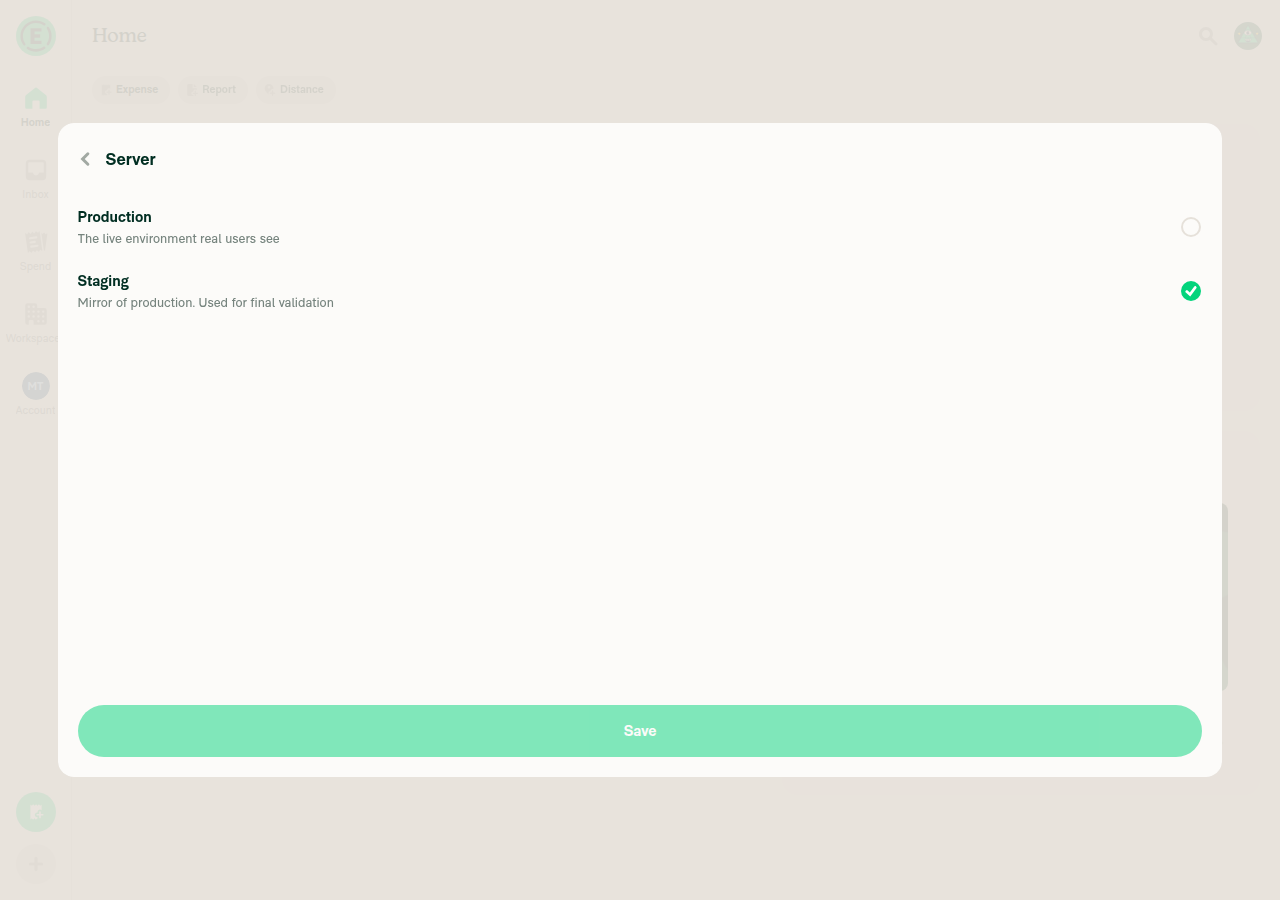
    3. Press the row and verify that a page titled "Server" opens listing exactly two rows, Production and
      Staging, each with a description and no QA row among them, and the current server selected. The
      active server sorts first, so the order follows the selection rather than being fixed.
    4. Press the back caret and verify that Troubleshoot is showing again.
    5. Press Cmd+D (Ctrl+D elsewhere) to open the test tools modal, and verify that the same "Server" row is
      present there and opens the same list inside the modal.
    6. Sign out, press Cmd+D on the sign-in screen, and verify that the row and the list still work with no
      session.
    7. Still signed out, load /connection-complete in the URL bar, press Cmd+D, press the "Server" row,
      then press Cmd+D again, and verify that the whole modal closes and the page underneath is showing.
      This is test 4.2 on the public navigator, which mounts the modal separately from the authenticated
      one, and it runs here to reuse the signed-out session step 6 leaves behind.
  2. Save commits the pick and closes the page, and leaving without Save discards it

    1. Open the Server page from Settings > Troubleshoot.
    2. Verify that the Save button is disabled while the selected row is the active server.
    3. Press Staging. Verify that the selection moves and Save becomes enabled, and that the Troubleshoot row
      behind it has not changed: the pick commits on Save, not on row tap, so leaving by the back caret
      discards it.
    4. Press the back caret without saving, and verify that the "Server" row still reads Production.
    5. Reopen the page and verify that Production is selected again, not Staging.
    6. Press Staging, then Save. Verify that the page closes on its own and Troubleshoot is showing with the
      "Server" row reading "Staging".
    7. Reopen the page from the test tools modal, press Production, then Save. Verify that the page closes
      and the test tools menu is showing with the row reading "Production".
  3. A production to staging switch moves the API root and signs nobody out

    1. From the state test 2 left, verify that you are still signed in and that no redirect to the sign-in
      page happens.
    2. Press Staging and Save, then run the root check and expect the staging root.
    3. Reload the page, and verify that the row still reads "Staging" and the root check still shows staging.
    4. Still on the reload from step 3, run the root check and read the entries in order. Verify that the
      earliest Ping calls are addressed to the production root and that everything from ReconnectApp
      onward goes to staging. An unread preference is indistinguishable from an unset one, so it stands in
      as production until Onyx hands the stored value back, which stops an environment that defaults to
      staging from ignoring an opt-out.
    5. Switch back to Production through the same page, and verify that the root check shows the production
      root.
  4. The test tools modal closes from the selector

    1. Press Cmd+D to open the test tools modal, then press the "Server" row to push the selector on top of
      it.
    2. Press Cmd+D again, and verify that the whole modal closes and the screen underneath is showing.
    3. Reopen the modal and the selector, press the back caret instead, and verify that the test tools menu
      is showing rather than the modal being dismissed.
  5. Optional, developer-only: a pinned build states its server instead of offering one
    1. Only a QA-environment build is pinned, so hard-code the environment for one run in
      src/hooks/useActiveServer.ts, and set QA_EXPENSIFY_URL in .env so the QA config is present.
      The file does not import CONST, so both lines are needed:

      // TEMPORARY - remove after testing
      import CONST from '@src/CONST';
      
      // ...then, as the first statement in useActiveServer
      return resolveActiveServer(storedServer, CONST.ENVIRONMENT.QA);
    2. Reload and open Settings > Troubleshoot. Verify that the "Server" row reads "QA", has no
      chevron, and does nothing when pressed.

    3. Load /settings/troubleshoot/server in the URL bar, which is the only way to the page on a pinned
      build: the test tools modal still shows the row, but renders it without a press handler. Verify that
      no row responds to a press, the Save button is absent, and the copy "This build always talks to one
      server, so it cannot be changed here." is shown above the list. A pinned QA build lists QA alongside
      Production and Staging, since the selector appends the active server when the offered set omits it.

    4. Run Onyx.set('activeServer', 'staging') in the browser console, and verify that QA is still
      the selected row.

    5. Revert both changes from step 1, the hard-coded environment and the QA_EXPENSIFY_URL entry,
      before committing.

The sign-out on a QA crossing has no step here: it needs the QA build target that part 4 supplies, so
nothing on this branch can reach QA.

  • Verify that no errors appear in the JS console

Offline tests

N/A: this PR changes which host a request is addressed to and adds a settings page, and it touches no queued
write, no optimistic update, and no persisted data beyond the activeServer key the selector writes. It
triggers no sign-out and sends no request of its own.

QA Steps

  1. Open Settings > Troubleshoot.
  2. Verify that a "Server" row is present, reading the current server, and that there is no "Use Staging
    Server" toggle.
  3. Press the row and verify that a page titled "Server" opens, listing exactly two options, Production and
    Staging in either order, each with a description below its label.
  4. Verify that the current server is the selected one and the Save button is disabled.
  5. Select the other server and verify that Save becomes enabled.
  6. Press the back caret without saving, and verify that the "Server" row still reads the original server.
  7. Reopen the page, select the other server, and press Save.
  8. Verify that the page closes on its own, Troubleshoot is showing, the row reads the server just picked,
    and you are still signed in.
  9. Reload the app and verify that the row still reads the picked server.
  10. Repeat steps 7 and 8 to switch back to the original server.
  • Verify that no errors appear in the JS console

PR Author Checklist

  • I linked the correct issue in the ### Fixed Issues section above
  • I wrote clear testing steps that cover the changes made in this PR
    • I added steps for local testing in the Tests section
    • I added steps for the expected offline behavior in the Offline steps section
    • I added steps for Staging and/or Production testing in the QA steps section
    • I added steps to cover failure scenarios (i.e. verify an input displays the correct error message if the entered data is not correct)
    • I turned off my network connection and tested it while offline to ensure it matches the expected behavior (i.e. verify the default avatar icon is displayed if app is offline)
    • I tested this PR with a High Traffic account against the staging or production API to ensure there are no regressions (e.g. long loading states that impact usability).
  • I included screenshots or videos for tests on all platforms
  • I ran the tests on all platforms & verified they passed on:
    • Android: Native
    • Android: mWeb Chrome
    • iOS: Native
    • iOS: mWeb Safari
    • MacOS: Chrome / Safari
  • I verified there are no console errors (if there's a console error not related to the PR, report it or open an issue for it to be fixed)
  • I followed proper code patterns (see Reviewing the code)
    • I verified that any callback methods that were added or modified are named for what the method does and never what callback they handle (i.e. toggleReport and not onIconClick)
    • I verified that comments were added to code that is not self explanatory
    • I verified that any new or modified comments were clear, correct English, and explained "why" the code was doing something instead of only explaining "what" the code was doing.
    • I verified any copy / text shown in the product is localized by adding it to src/languages/* files and using the translation method
      • If any non-english text was added/modified, I used JaimeGPT to get English > Spanish translation. I then posted it in #expensify-open-source and it was approved by an internal Expensify engineer. Link to Slack message:
    • I verified all numbers, amounts, dates and phone numbers shown in the product are using the localization methods
    • I verified any copy / text that was added to the app is grammatically correct in English. It adheres to proper capitalization guidelines (note: only the first word of header/labels should be capitalized), and is either coming verbatim from figma or has been approved by marketing (in order to get marketing approval, ask the Bug Zero team member to add the Waiting for copy label to the issue)
    • I verified proper file naming conventions were followed for any new files or renamed files. All non-platform specific files are named after what they export and are not named "index.js". All platform-specific files are named for the platform the code supports as outlined in the README.
    • I verified the JSDocs style guidelines (in STYLE.md) were followed
  • If a new code pattern is added I verified it was agreed to be used by multiple Expensify engineers
  • I followed the guidelines as stated in the Review Guidelines
  • I tested other components that can be impacted by my changes (i.e. if the PR modifies a shared library or component like Avatar, I verified the components using Avatar are working as expected)
  • I verified all code is DRY (the PR doesn't include any logic written more than once, with the exception of tests)
  • I verified any variables that can be defined as constants (ie. in CONST.ts or at the top of the file that uses the constant) are defined as such
  • I verified that if a function's arguments changed that all usages have also been updated correctly
  • If any new file was added I verified that:
    • The file has a description of what it does and/or why is needed at the top of the file if the code is not self explanatory
  • If a new CSS style is added I verified that:
    • A similar style doesn't already exist
    • The style can't be created with an existing StyleUtils function (i.e. StyleUtils.getBackgroundAndBorderStyle(theme.componentBG))
  • If new assets were added or existing ones were modified, I verified that:
    • The assets are optimized and compressed (for SVG files, run npm run compress-svg)
    • The assets load correctly across all supported platforms.
  • If the PR modifies code that runs when editing or sending messages, I tested and verified there is no unexpected behavior for all supported markdown - URLs, single line code, code blocks, quotes, headings, bold, strikethrough, and italic.
  • If the PR modifies a generic component, I tested and verified that those changes do not break usages of that component in the rest of the App (i.e. if a shared library or component like Avatar is modified, I verified that Avatar is working as expected in all cases)
  • If the PR modifies a component related to any of the existing Storybook stories, I tested and verified all stories for that component are still working as expected.
  • If the PR modifies a component or page that can be accessed by a direct deeplink, I verified that the code functions as expected when the deeplink is used - from a logged in and logged out account.
  • If the PR modifies the UI (e.g. new buttons, new UI components, changing the padding/spacing/sizing, moving components, etc) or modifies the form input styles:
    • I verified that all the inputs inside a form are aligned with each other.
    • I added Design label and/or tagged @Expensify/design so the design team can review the changes.
  • If a new page is added, I verified it's using the ScrollView component to make it scrollable when more elements are added to the page.
  • I added unit tests for any new feature or bug fix in this PR to help automatically prevent regressions in this user flow.
  • If the main branch was merged into this PR after a review, I tested again and verified the outcome was still expected according to the Test steps.

Screenshots/Videos

Android: Native
Android: mWeb Chrome
iOS: Native
iOS: mWeb Safari
MacOS: Chrome / Safari
logged.out.switch.mp4
logged.in.switch.mp4

@melvin-bot

melvin-bot Bot commented Sep 2, 2026

Copy link
Copy Markdown

Hey, I noticed you changed src/languages/en.ts in a PR from a fork. For security reasons, translations are not generated automatically for PRs from forks.

If you want to automatically generate translations for other locales, an Expensify employee will have to:

  1. Look at the code and make sure there are no malicious changes.
  2. Run the Generate static translations GitHub workflow. If you have write access and the K2 extension, you can simply click: [this button]

Alternatively, if you are an external contributor, you can run the translation script locally with your own OpenAI API key. To learn more, try running:

npx bun ./scripts/generateTranslations.ts --help

Typically, you'd want to translate only what you changed by running npx bun ./scripts/generateTranslations.ts --compare-ref main

@codecov

codecov Bot commented Sep 2, 2026 •

Copy link
Copy Markdown

Codecov Report

✅ Changes either increased or maintained existing code coverage, great job!

Files with missing lines Coverage Δ
src/CONST/index.ts 94.11% <ø> (+0.89%) ⬆️
src/SCREENS.ts 100.00% <ø> (ø)
src/components/TestToolMenu.tsx 96.55% <100.00%> (+2.67%) ⬆️
src/libs/ApiUtils.ts 97.61% <100.00%> (+2.38%) ⬆️
...s/FraudProtection/GroupIBSdkBridge/index.native.ts 80.48% <100.00%> (ø)
...ppNavigator/Navigators/TestToolsModalNavigator.tsx 6.66% <ø> (ø)
...igation/linkingConfig/RELATIONS/SETTINGS_TO_RHP.ts 100.00% <ø> (ø)
src/libs/Navigation/linkingConfig/config.ts 62.50% <ø> (ø)
src/libs/actions/TestTool.ts 64.28% <100.00%> (+45.76%) ⬆️
src/libs/shouldSkipDeepLinkNavigation/common.ts 100.00% <100.00%> (ø)
... and 13 more
... and 633 files with indirect coverage changes

@sharabai
sharabai force-pushed the qa-env/2-server-selection branch from 7abcae8 to 3b21f59 Compare September 9, 2026 10:56
…tion

# Conflicts:
#	src/ROUTES.ts
#	src/components/TestToolMenu.tsx
#	src/libs/Navigation/linkingConfig/RELATIONS/SETTINGS_TO_RHP.ts
@sharabai

sharabai commented Sep 9, 2026

Copy link
Copy Markdown
Contributor Author

@codex review

@sharabai

sharabai commented Sep 9, 2026

Copy link
Copy Markdown
Contributor Author

@MelvinBot review

@sharabai

sharabai commented Sep 9, 2026

Copy link
Copy Markdown
Contributor Author

@MelvinBot find regressions

@sharabai sharabai changed the title [HOLD for #99926] Add a server selection page and sign out on a QA crossing (part 2/5) Add a server selection page and sign out on a QA crossing (part 2/5) Sep 9, 2026

@chatgpt-codex-connector chatgpt-codex-connector Bot left a comment

Copy link
Copy Markdown

Choose a reason for hiding this comment

The reason will be displayed to describe this comment to others. Learn more.

💡 Codex Review

Here are some automated review suggestions for this pull request.

Reviewed commit: 534bfa793b

ℹ️ About Codex in GitHub

Codex has been enabled to automatically review pull requests in this repo. Reviews are triggered when you

  • Open a pull request for review
  • Mark a draft as ready
  • Comment "@codex review".

If Codex has suggestions, it will comment; otherwise it will react with 👍.

When you sign up for Codex through ChatGPT, Codex can also answer questions or update the PR, like "@codex address that feedback".

Comment thread src/pages/settings/Troubleshoot/ServerSelector.tsx Outdated
@MelvinBot

Copy link
Copy Markdown
Contributor

🤖 Reviewed at 534bfa7. The selector, the resolveActiveServer refactor, and the getBackToParam fix all look sound. Four things to fix before this merges — the first two are the big ones.

1. The PR doesn't do half of what the title and description say

The title says "sign out on a QA crossing," and the description's IMPORTANT block describes a Request.server pin, a getApiRoot change, and a hasAuthToken() guard in signOutAndRedirectToSignIn. None of that is in the diff. setActiveServer still only writes Onyx, getApiRoot gained no server argument, and Session/index.ts isn't touched. The described suites (SetActiveServerSignOutTest.ts, ApiUtilsTest.ts pin cases, SessionTest.ts, TestToolMenuBiometricsTest.tsx) don't exist in the 32 changed files either. Either the sign-out was deferred to a later part and the description is stale, or commits are missing.

2. Save doesn't close the page

onConfirm: () => setActiveServer(selectedServer) never navigates. SelectionList's footer calls onConfirm and nothing else, so the page stays open and Save just greys itself out — no feedback that anything happened. Your own Tests step 2.6 and QA step 8 both assert "the page closes," so they'll fail as written. Compare LanguagePage.tsx:42-46, which is the same pattern and does Navigation.goBack() inside the handler.

3. confirmServerChangeDescription is dead in all 11 locale files

en.ts:2382 plus the ten translations — no source file references it. It's the copy for the confirmation modal from item 1. Drop it, or land it with the code that uses it.

4. isPinnedByEnvironment is true on every build until the environment resolves

useActiveServer takes environment from useEnvironment(), which defaults to PRODUCTION until EnvironmentProvider's effect resolves it. So the first committed render on a staging build reports {PRODUCTION, isPinnedByEnvironment: true}: the Troubleshoot row paints as "Production" with no chevron and isn't pressable, and a cold load of settings/troubleshoot/server paints with Save hidden, the list disabled, and the "This build always talks to one server" header — then flips. The old const [activeServer = getActiveServer()] = useOnyx(...) didn't have this because the module-level state was already resolved. Treating an unresolved environment as not-pinned would fix it.

Nits and notes
  • Test step 5.2 doesn't exercise the new pop branch. toggleTestToolsModal always sets backTo when opening the modal (getActiveRoute(), or ROUTES.ROOT when signed out), so getBackToParam() returns a value and Navigation.goBack(backTo) runs — goUp pops the whole modal navigator, so the step passes, but for the old reason. The Navigation.pop(rootKey) branch is only reachable via a direct /test-tools deeplink, which is what ServerSelectionTest mocks. Worth saying so in the steps.
  • Two existing call sites could use the new hook. DynamicWorkspaceCompanyCardDetailsPage.tsx:108 and SelectBankStep.tsx:37 still read the raw ACTIVE_SERVER value, so a stored qa that resolveActiveServer would reject still reaches them. Pre-existing, but useActiveServer is the fix and it's now available.
  • settings/troubleshoot/server is deeplinkable on a local-web build, where the Troubleshoot row is hidden by !CONFIG.IS_USING_LOCAL_WEB but the page isn't. Save writes ACTIVE_SERVER, resolveActiveServer ignores it, and the row stays on Production. Dev-only and harmless, just silently inert.
  • CI is green apart from checklist and Check independent approval.

Next Steps: Reply with @MelvinBot <your feedback> to dig into any of these.

@MelvinBot

Copy link
Copy Markdown
Contributor

🤖 Regression hunt on 534bfa7. Three regressions against the behaviour the staging toggle had, one confirmed on a live web build.

1. Save leaves you on the page with no sign anything happened — confirmed on web

Drove the branch on web: selecting Staging enables Save, but pressing Save leaves the Server page exactly where it was. The only feedback is the button fading back to disabled.

Server page with Staging selected and Save enabled Server page still open after pressing Save

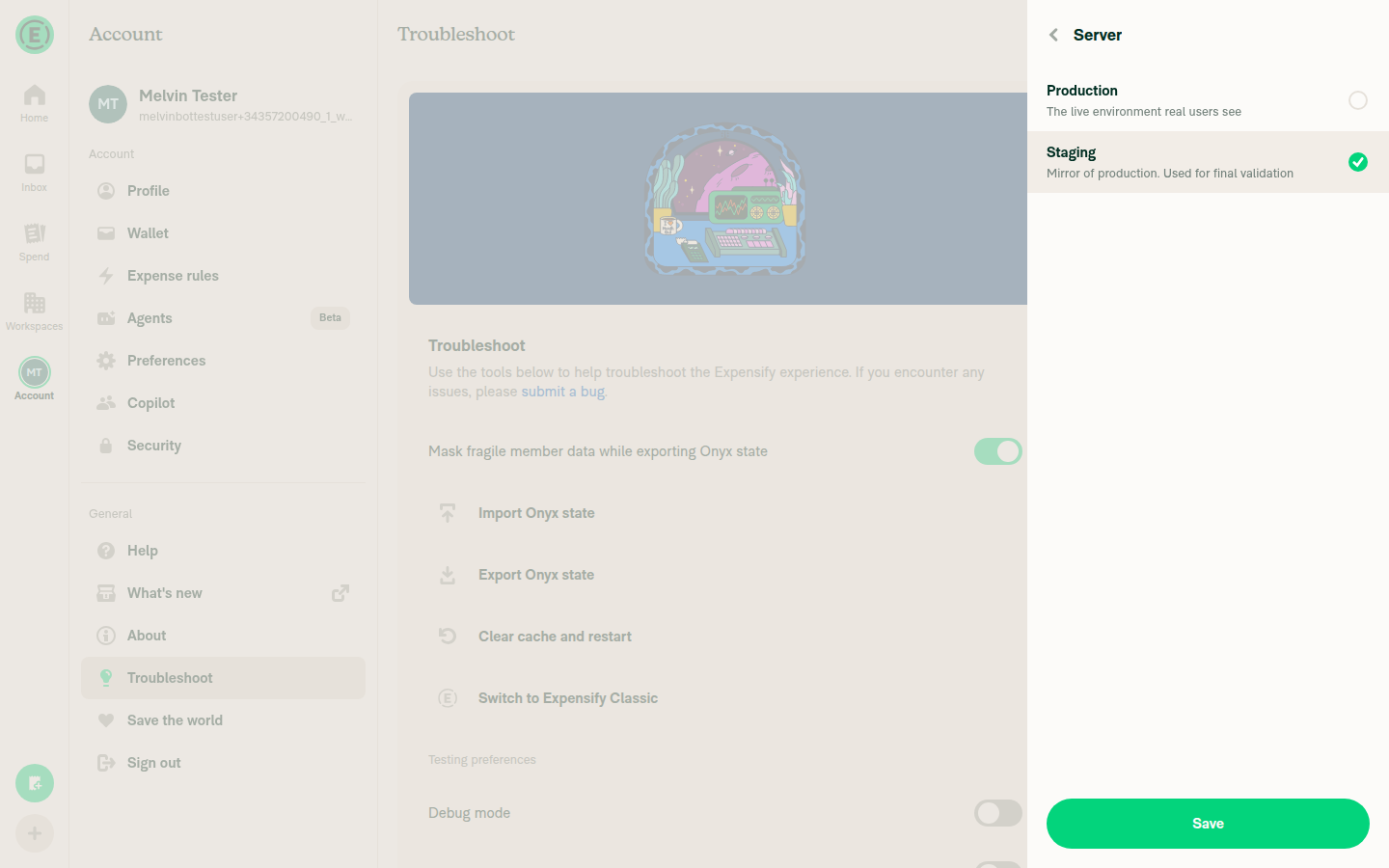
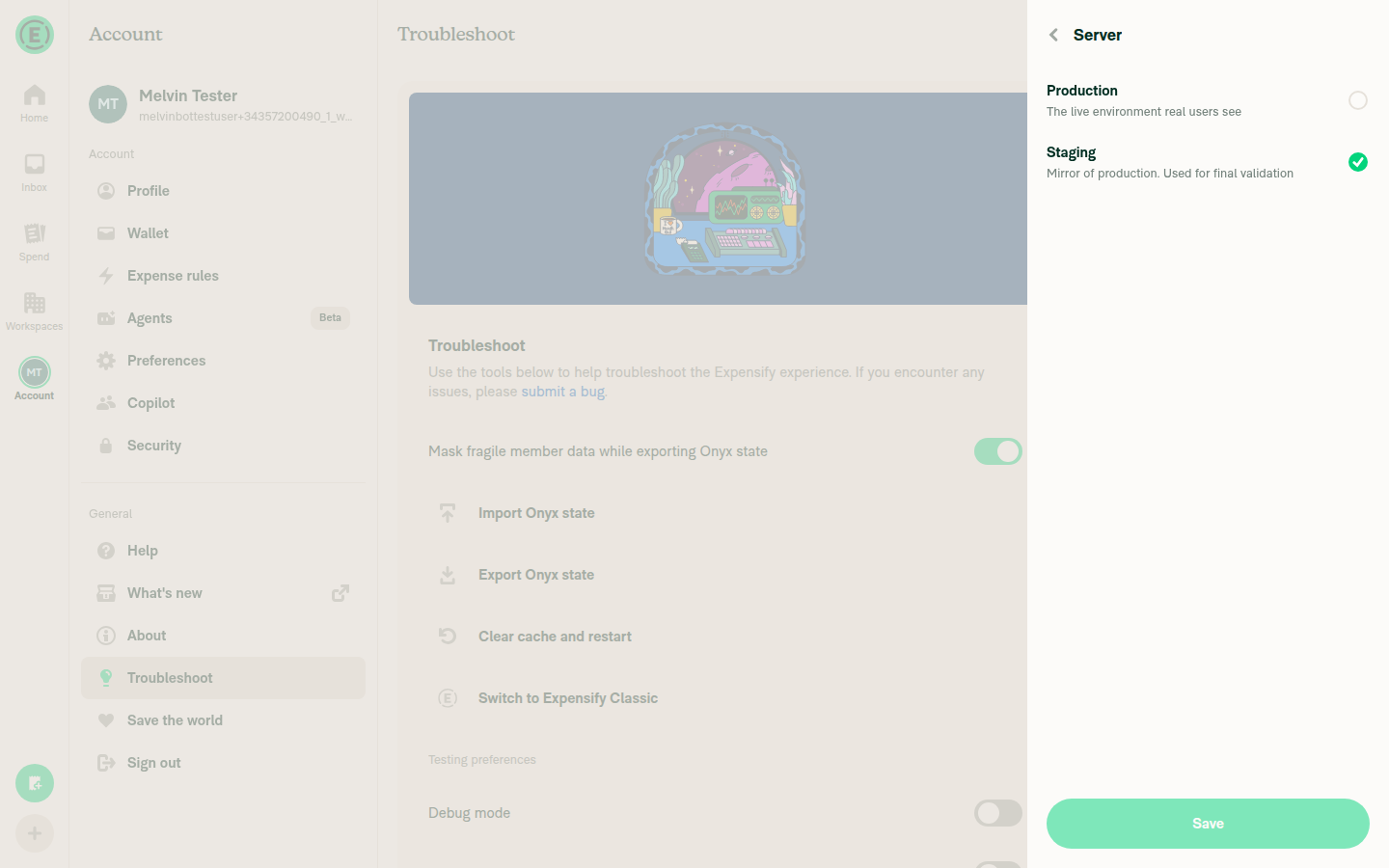
onConfirm: () => setActiveServer(selectedServer) never navigates, and SelectionList's footer only calls onConfirm. The old toggle applied instantly and left you on Troubleshoot, so this is a straight loss of feedback. LanguagePage.tsx:42-46 is the same pattern and calls Navigation.goBack() in the handler. Tests step 2.6 and QA step 8 both assert the page closes, so both fail today.

2. The row reports the wrong server on the first render of every non-dev build

useActiveServer takes environment from useEnvironment(), which defaults to PRODUCTION until EnvironmentProvider's effect resolves the real one. resolveActiveServer(…, PRODUCTION) returns {PRODUCTION, isPinnedByEnvironment: true}, so the first committed render on a staging or adhoc build paints "Production" with no chevron and no press handler, then flips to a pressable "Staging". On a cold load of settings/troubleshoot/server the same render shows Save hidden, the list disabled, and the "This build always talks to one server" header.

The old const [activeServer = getActiveServer()] = useOnyx(...) read module state that was already resolved, so it never had this window. The live run didn't surface it because a dev build resolves to PRODUCTION too, making the wrong first value identical to the right one — the flash only shows where the environment isn't production.

3. Switching servers went from one tap to four, and QA steps assume otherwise

Row → page → option → Save, versus one switch flip. That's a deliberate trade for making the QA crossing confirmable, but the confirmation isn't in this PR (see my earlier review), so right now it's cost without the benefit. Combined with 1, a tester gets no success signal at all. Worth saying explicitly in the QA steps that the change is deliberate.

Lower-risk notes, and three things I checked that are not regressions

Lower risk

  • Navigation.pop(rootKey) replaces Navigation.goBack() and so skips canNavigate(), TransitionTracker.runAfterTransitions, and the popAndRealignMfaMarker bracket that goBack wraps every pop in. Only reachable when the modal was opened without a backTo (a direct /test-tools deeplink), and only matters if an MFA marker is the last history entry, so the blast radius is tiny — but it is a raw dispatch into shared navigation state.
  • GroupIB now maps the QA environment to gib-w-expensify-uat on web but gib-i/a-expensify-stg on native. Probably intentional, easy to have been a copy-paste.

Checked, not regressions

  • Stranding on a /test-tools cold load. I expected pop on a single-route root stack to be a no-op and leave the modal undismissable. It isn't: getAdaptedStateFromPath prepends a default full-screen route when none matches, so the root always has something under the modal, signed in or out.
  • The getBackToParam rewrite. Reading backTo off the modal's root screen instead of the focused route only widens when it returns a value, and its one caller is already gated on the modal being active. The Cmd+D-from-the-selector case in Tests step 5 goes through goBack(backTo) → goUp, which pops the whole modal navigator — so it works, just via the backTo branch rather than the new pop branch.
  • Production builds. The row renders as inert text instead of the old toggle that looked live but was ignored by resolveActiveServer. That's an improvement.

Not covered by the live run: the web harness can't send a Ctrl+D chord, so everything reached through the test tools modal was verified by reading the code rather than by driving it.


Next Steps: Reply with @MelvinBot <your feedback> to dig into any of these.

@sharabai sharabai changed the title Add a server selection page and sign out on a QA crossing (part 2/5) Add a server selection page (part 2/5) Sep 9, 2026
@sharabai

sharabai commented Sep 9, 2026

Copy link
Copy Markdown
Contributor Author

Replying to this comment.

Fixed: #1, #2, #3. #2 in 3d85e87, where Save commits and then goes back. #3 in 05f7c06, all 11 keys dropped, since part 4 owns the modal that uses them. #1 was a stale description rather than missing commits: the title and description now describe the selector-only scope this branch has, with the QA row and the sign-out it needs left to part 4.

CI. Right, checklist and Check independent approval are still the only two red.

The local-web deeplink. Right, and inert rather than harmful. One correction: a stored qa is exempt from the local-web branch in resolveActiveServer, so once QA is configured the selection does take effect there.

The two raw ACTIVE_SERVER readers. Right, and undercounted at three: PersonalCardDetailsPage.tsx:58 has the same pattern. The divergence is also wider than a stored qa, because a production bundle pins production over any stored value at all. All pre-existing, so they get filed rather than folded into this PR.

Step 5.2 and the pop branch. Wrong on the mechanism. ROUTES.ROOT is the empty string and getUrlWithBackToParam drops a falsy backTo, so a signed-out open navigates to plain test-tools with no backTo and the branch runs on the ordinary signed-out close, not only on a deeplink. ServerSelectionTest.tsx:243-245 already asserts it. The narrower point is right, and step 5.2 now says so: signed in it runs goBack(backTo), which covers the getBackToParam rewrite rather than the pop branch.

#4, the unresolved environment. Half wrong, and the rest is not getting fixed here. The Troubleshoot row cannot paint pinned, because the page renders the whole test tool menu under {!isProduction && ...} off that same unresolved context, so the menu is unmounted for exactly the renders where the flag is spuriously true and appears only once the environment has resolved: TroubleshootPage.tsx:236. The cold load of the server page is real, but only on an Android release build, where the environment waits on a GitHub release fetch; on web it is one already-settled microtask, and the app renders nothing until the Onyx migration finishes, so no screen exists during the window. Leaving it, since the fix means widening the shared environment context with a resolved flag for one developer-only page.

@sharabai

sharabai commented Sep 9, 2026

Copy link
Copy Markdown
Contributor Author

Replying to this comment.

#1 is fixed in 3d85e87, #2 is answered here, and the GroupIB split is intended: each QA row copies its own file's ADHOC value, and that web-versus-native asymmetry arrived in 3e0c60b6 (2025-09-26), which moved native ADHOC off uat and left web on it.

The Navigation.pop note is wrong on reachability, and its mechanism holds on two counts that cost nothing. The branch is not deeplink-only: getAdaptedStateFromPath.ts:400-406 returns early without prepending TAB_NAVIGATOR when every root route is a public screen, so a cold load on validate-login, transition, SAML sign-in, unlink-login or connection-complete leaves isAuthenticated false and backToRoute empty, and an ordinary Ctrl+D takes the pop. On the skipped calls, canNavigate is a readiness check plus a log (Navigation.ts:195-201) and pop optional-chains the same ref, while runAfterTransitions dispatches synchronously unless options ask otherwise (TransitionTracker.ts:165-168), and no call here passes any. That leaves the MFA bracket, which does no work unless the marker is last in the root history: the public root carries no history array at all, and the one MFA trigger rendered inside the modal dismisses the modal before it starts the flow. Leaving the call as it is, with the comments around it tightened in 5e77e938.

On #3, the four taps are deliberate, but the QA steps do not assume one: steps 1 through 8 open Troubleshoot, press the row, select a server and press Save, and the old toggle's behaviour is carried as an explicit regression test in the Tests section.

@sharabai

sharabai commented Sep 9, 2026

Copy link
Copy Markdown
Contributor Author

@codex review

@sharabai

sharabai commented Sep 9, 2026

Copy link
Copy Markdown
Contributor Author

@MelvinBot review

@sharabai

sharabai commented Sep 9, 2026

Copy link
Copy Markdown
Contributor Author

@MelvinBot find regressions

@MelvinBot

Copy link
Copy Markdown
Contributor

🤖 Re-reviewed at 5e77e93. Three of the four items from my last pass are fixed. One is still open.

Fixed:

  • saveAndGoBack commits and navigates, and ServerSelectionTest now asserts the goBack.
  • confirmServerChangeDescription is gone from all 11 locale files.
  • The title and description no longer claim the QA sign-out. The body now says setActiveServer is unchanged and defers the crossing to part 4, which matches the diff.

Still open: isPinnedByEnvironment is true on the first render of every build

useActiveServer is unchanged, and useEnvironment() still defaults to PRODUCTION until EnvironmentProvider's useEffect resolves the real value — an effect, so at least one frame paints first. resolveActiveServer(…, PRODUCTION) returns {PRODUCTION, isPinnedByEnvironment: true}, so on a staging or adhoc build the first painted frame is the pinned state: the Troubleshoot row reads "Production" with no chevron and no press handler, and a reload while on settings/troubleshoot/server paints with every row disabled, Save hidden, and the "This build always talks to one server" copy — then flips.

It's one frame, and only where the environment isn't production, so it's a flash rather than a broken flow. But it's a new window the old const [activeServer = getActiveServer()] = useOnyx(...) didn't have, since that read module state resolved at boot. Treating an unresolved environment as not-pinned closes it.

Worth noting because your new Tests step 6 hard-codes CONST.ENVIRONMENT.PRODUCTION in this exact hook to reach the pinned state — which is the same value the hook already returns for one frame on every build, unprompted.

Two notes on the rewritten description
  • Your account of the pop path checks out, and it's broader than I said. I'd called the no-backTo branch deeplink-only. It isn't: ROUTES.ROOT is '', so getUrlWithBackToParam appends no param and getBackToParam() returns undefined for any public-screen open where TAB_NAVIGATOR is absent from the root — not just a typed /test-tools. New steps 1.7 and 5.5 cover it.
  • CI is green apart from Check independent approval.

Next Steps: Reply with @MelvinBot <your feedback> to dig into any of these.

@chatgpt-codex-connector chatgpt-codex-connector Bot left a comment

Copy link
Copy Markdown

Choose a reason for hiding this comment

The reason will be displayed to describe this comment to others. Learn more.

💡 Codex Review

Here are some automated review suggestions for this pull request.

Reviewed commit: 5e77e938da

ℹ️ About Codex in GitHub

Codex has been enabled to automatically review pull requests in this repo. Reviews are triggered when you

  • Open a pull request for review
  • Mark a draft as ready
  • Comment "@codex review".

If Codex has suggestions, it will comment; otherwise it will react with 👍.

When you sign up for Codex through ChatGPT, Codex can also answer questions or update the PR, like "@codex address that feedback".

Comment thread src/libs/ApiUtils.ts Outdated
@sharabai

sharabai commented Sep 9, 2026

Copy link
Copy Markdown
Contributor Author

Replying to this comment.

The pinned-flag item is answered here, and the disproof still holds at 5e77e93: the row lives inside the !isProduction gate at TroubleshootPage.tsx:236, so the whole test tool menu is unmounted for exactly the renders where the flag is spuriously true.

Step 1 of the optional developer-only test, Test 5 since the description was renumbered after that review, shows the same thing rather than cutting against it. It hard-codes the value inside useActiveServer only, so the gate above still reads the real environment and the row stays mounted, which is why the step reaches the pinned state and the transient frame does not.

@MelvinBot

Copy link
Copy Markdown
Contributor

🤖 Regression hunt on 5e77e93. One confirmed regression, everything else I chased came back clean. Live web run below.

Regression: useActiveServer reports Production and isPinnedByEnvironment: true on the first render

On main, TestToolMenu did const [activeServer = getActiveServer()] = useOnyx(ONYXKEYS.ACTIVE_SERVER) — the fallback read ApiUtils module state, resolved once at app boot, so it was always correct by the time anything rendered.

useActiveServer now takes environment from useEnvironment(), which starts at PRODUCTION until EnvironmentProvider's effect resolves it. So resolveActiveServer(stored, PRODUCTION) returns {PRODUCTION, isPinnedByEnvironment: true} on the first committed render.

On a staging or adhoc build that means the first paint of Troubleshoot shows a non-pressable "Production" row, and a refresh straight onto settings/troubleshoot/server paints with Save hidden, the list disabled, and the "This build always talks to one server" header — then flips. Taps in that window do nothing.

It's invisible on production builds (the default already matches) and on the dev build I tested, where the label reads "Production" either way — which is why the live run below is clean. Treating an unresolved environment as not-pinned fixes it.

Live web run

The happy paths work end to end. Save now closes the page and the row updates, so my earlier finding on that is resolved.

Server restored to Production

Step Status
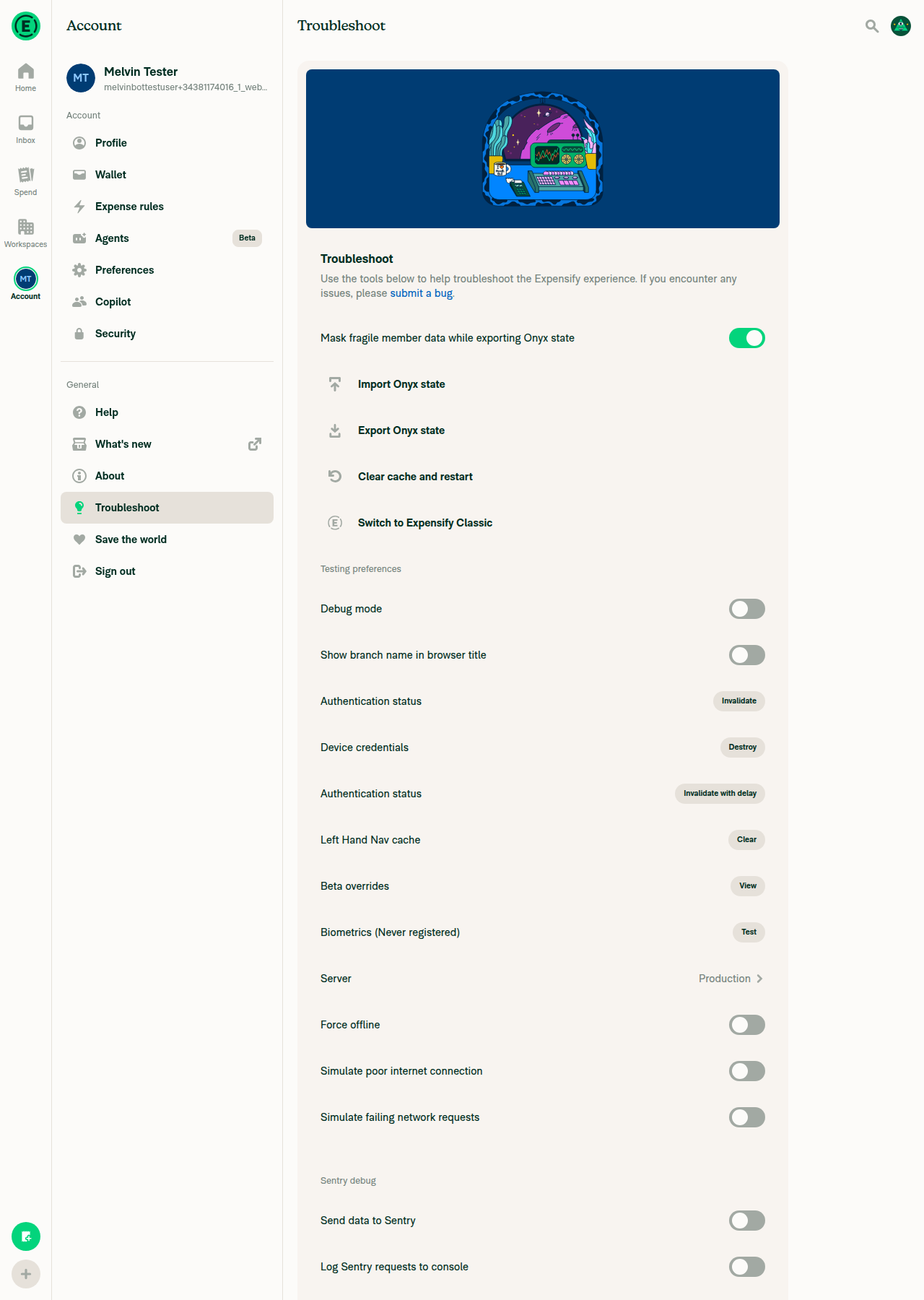
Settings > Troubleshoot renders, no crash; Server row presentPage rendered fully with no red-box and no "Something went wrong". The Server row is present and reads "Production" with a chevron.
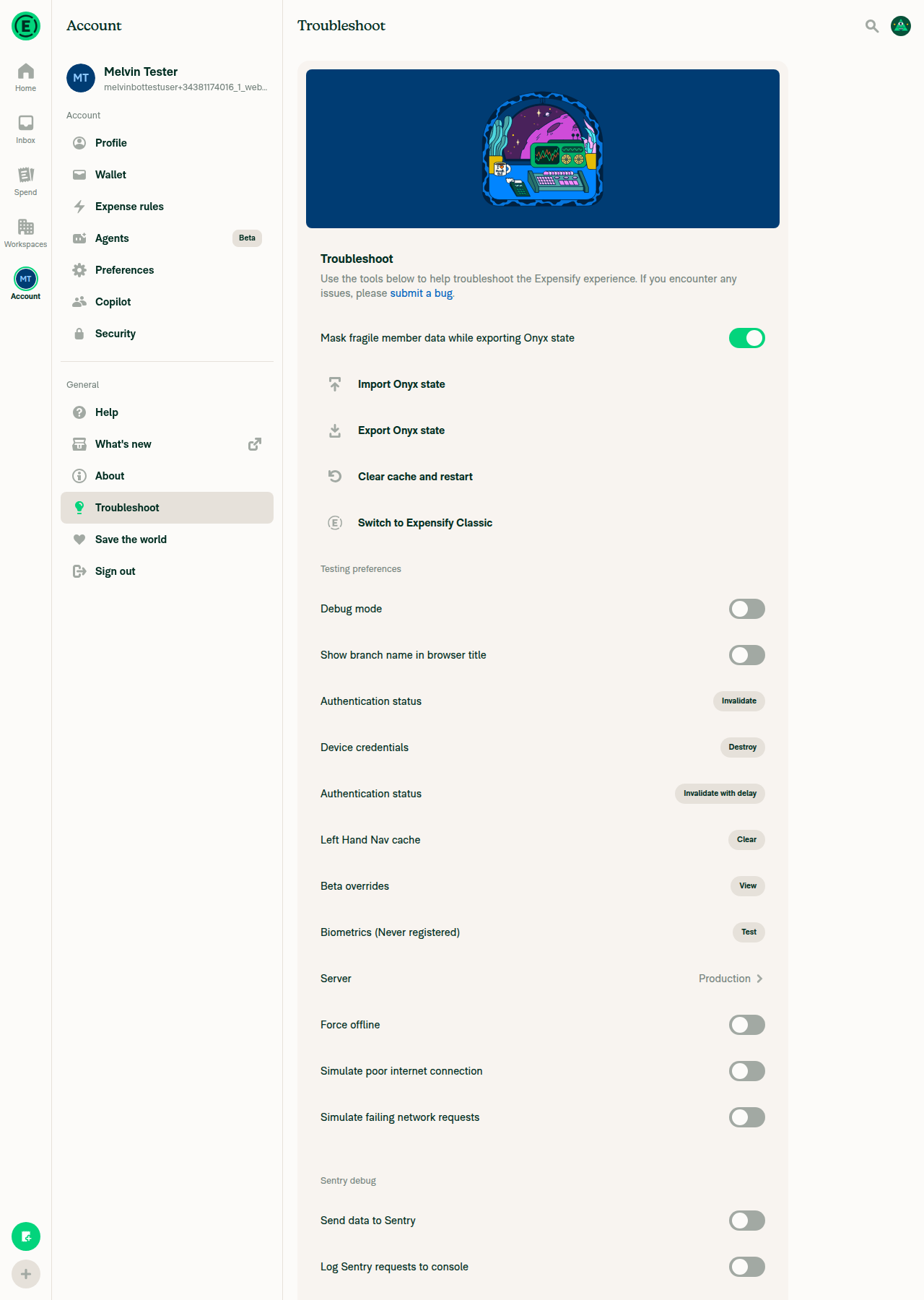
Troubleshoot page with the Server row reading Production
✅
settings/troubleshoot/server renders with the active server selected and Save disabledRHP titled "Server" with Production (selected) and Staging, each with its description. Save present; clicking it with no pending change was a no-op.
Server page with Production selected and Save disabled
✅
Picking Staging moves the selection and enables SaveCheckmark moved to Staging, Save went from muted to solid green.
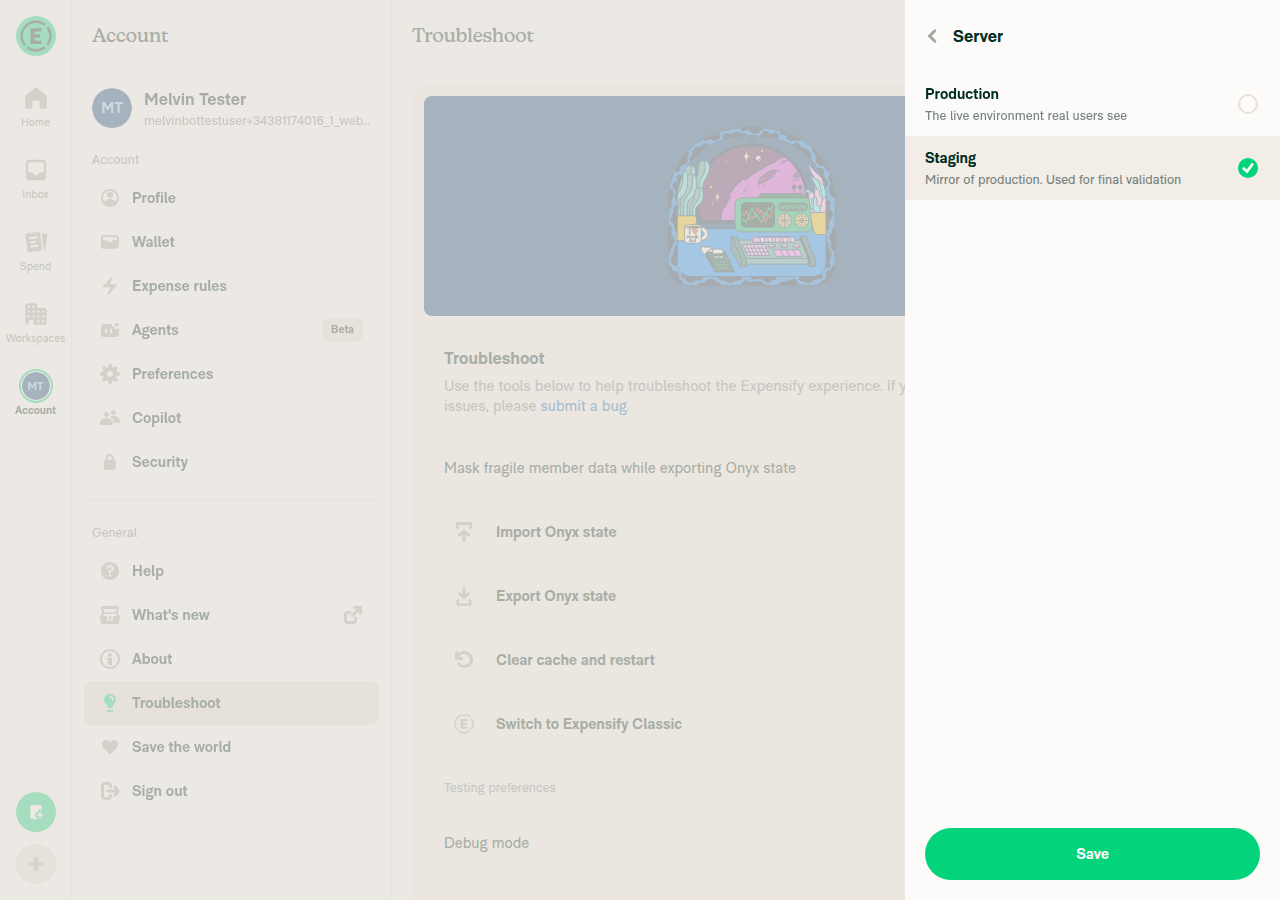
Staging selected and Save enabled
✅
Save closes the page and commits the pickThe whole Server page closed back to Troubleshoot and the row read "Staging".
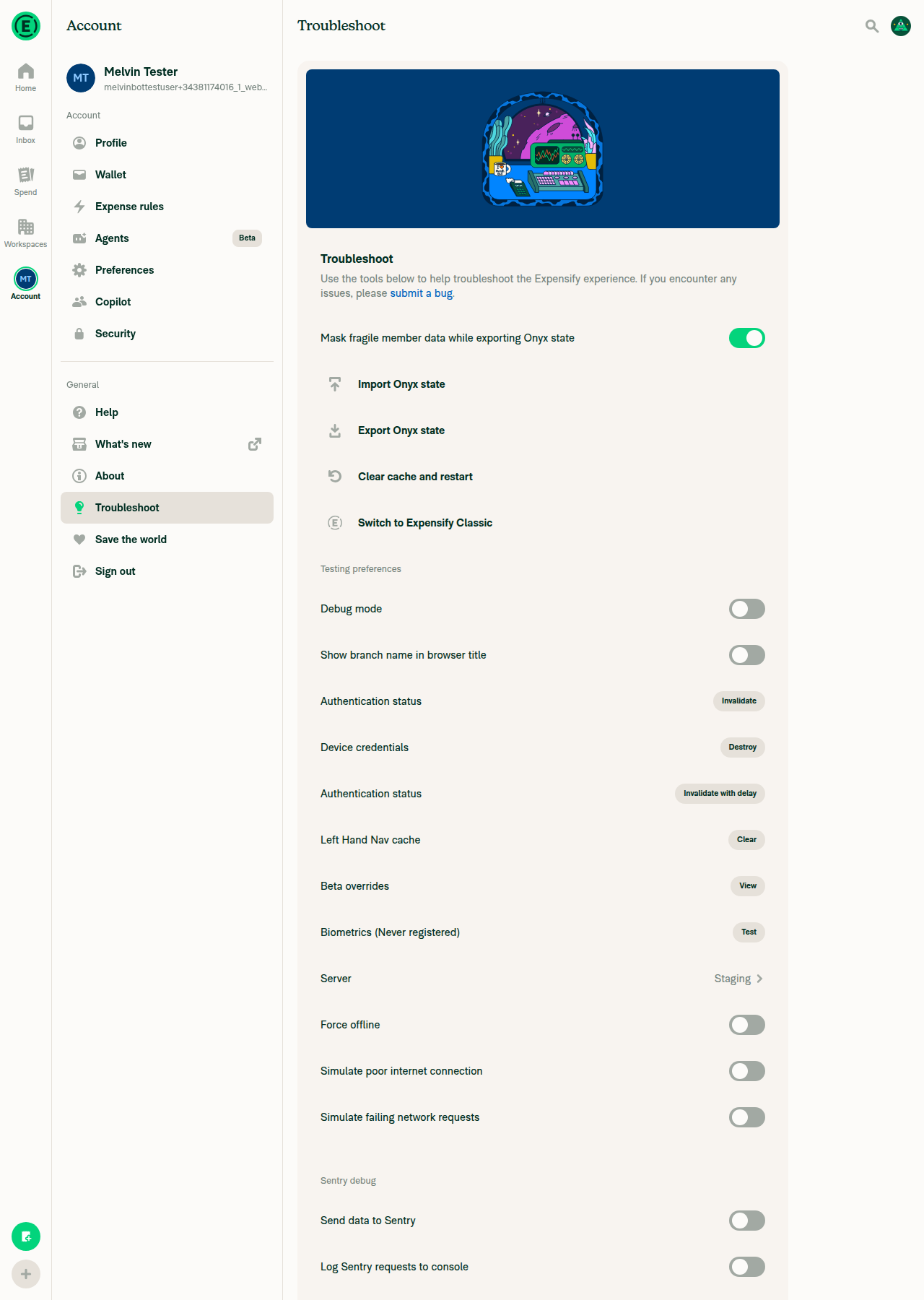
Troubleshoot after Save, Server row reads Staging
✅
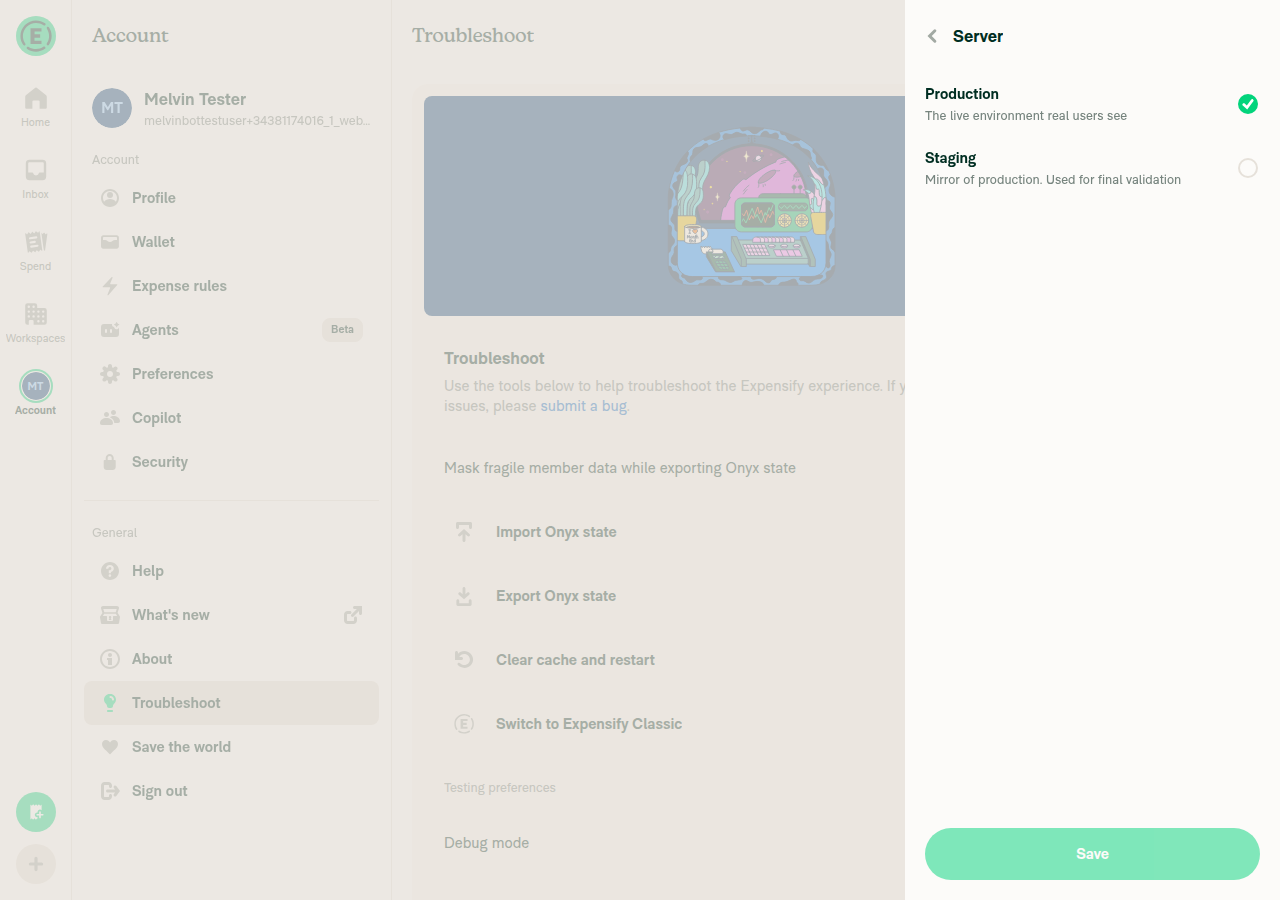
test-tools/server renders the selector inside the modalBoth rows fully visible at normal size inside the test tools modal — not blank, zero-height, or clipped. Saving from here closed the modal.
Server selector rendered inside the test tools modal
✅
Ctrl+D open/dismiss, including from the pushed selectorNot run. The web driver has no primitive for a modifier-key chord and Test Tools has no clickable trigger, so the getBackToParam and pop changes are unverified at runtime.
⚠️

Coverage gap

The Ctrl+D dismissal path is the part of this PR most likely to regress existing behaviour and it's the one part I could not exercise. Please run Tests 5.1–5.4 by hand. Native and HybridApp aren't covered by this run either.

Chased and cleared — not regressions
  • Navigation.pop(rootKey) replacing Navigation.goBack() in TestTool.ts:36-38. I expected this to strand a user who opened /test-tools by direct link: StackRouter's POP returns null when the target index is 0, whereas the old goBack() had an explicit resetToAppRoot() escape for exactly that case. It doesn't happen — getAdaptedState always prepends a full-screen route when building state from a path, so the root stack has at least two routes and the pop lands. Worth knowing the escape hatch is gone if that ever stops holding.
  • getBackToParam() widening from the focused route to any TEST_TOOLS_MODAL_NAVIGATOR in the root stack. Every caller is gated behind getActiveRoute().includes('test-tools'), which is only true when the modal is focused, so there's no reachable behaviour difference.
  • The new test-tools/server path colliding with test-tools. Nothing else in src/ string-matches test-tools, and both patterns are exact: true.
  • cidMap retyped to Record<Environment, string>. Purely additive QA keys; no existing environment's value changed.
  • TestToolMenu's new required prop. Both call sites updated.
  • Nesting the new pressable inside TestToolsModalPage's wrapper. That wrapper is accessible={false} with no onPress — same as the existing Switch and Button children.
Non-code fallout worth a heads-up

The accessibilityLabel="Use Staging Server" switch is gone. Any QA or Applause automation keyed on that label breaks with this PR — worth a note to whoever owns those scripts.


Next Steps: Reply with @MelvinBot <your feedback> to dig into any of these.

@sharabai

sharabai commented Sep 9, 2026

Copy link
Copy Markdown
Contributor Author

Replying to this comment.

Not a bug, and it is the third landing of this one: answered here and here.

The flag is spuriously pinned on the first committed render, and neither surface can paint it. The Troubleshoot row's only mount path is inside the test tool menu, gated on !isProduction read from the same context in the same render (TroubleshootPage.tsx:236), so it is unmounted for exactly the renders where the flag is wrong. The routed server page has no such gate, but it cannot mount in that window either: the environment provider sits above Expensify, which renders nothing until the Onyx migration resolves (Expensify.tsx:289), and on web the environment is a resolved promise over a build constant (getEnvironment/index.ts:8), so it lands a microtask after the provider mounts.

The one build where the environment is genuinely slow is a TestFlight staging build waiting on the native beta check, and there the synchronous config reports production as well, so the cross-check BetaOverridesPage uses would not help. Treating an unresolved environment as not-pinned means adding a resolved flag to the shared context, which PR #99444 weighed six days ago and settled the other way for rows and menus.

@sharabai
sharabai marked this pull request as ready for review September 9, 2026 18:21
@huult

huult commented Sep 22, 2026 •

Copy link
Copy Markdown
Contributor

@sharabai Is this PR ready for me to review again? Tag me when it’s ready again. Thanks!

@sharabai

sharabai commented Sep 22, 2026 •

Copy link
Copy Markdown
Contributor Author

@sharabai Is this PR ready for me to review again? Tag me when it’s ready again. Thanks!

@huult still in progress. Will do!

@sharabai

Copy link
Copy Markdown
Contributor Author

BUG: On any page other than Home, reloading with the Test Tools server modal open and then closing it redirects me to Home. I suspect the backTo route is missing.

Fixed in f056605. Your suspicion was right: the selector route dropped backTo, so the reload had nothing to rebuild the origin page from.

@sharabai

Copy link
Copy Markdown
Contributor Author

BUG: The Test Tools server modal reappears after I log in.

Fixed in e440903.

Worth flagging that this one is not from this PR. It reproduces on main the same way, on the Troubleshoot panel as well as the server modal. The fix turned out to be small and lives right next to what this PR already touches, so I folded it in here rather than opening a separate issue.

@sharabai

Copy link
Copy Markdown
Contributor Author

@huult thanks for the review! Great catches! I've addressed everything you pointed out. Main is merged into the branch.

@sharabai
sharabai requested a review from huult September 22, 2026 19:56
@huult

huult commented Sep 23, 2026

Copy link
Copy Markdown
Contributor

Thanks, I’ll review it soon.

"../../src/pages/workspace/WorkspacesListPage.tsx" "rulesdir/no-direct-personal-details-list" 1
"../../src/polyfills/requestIdleCallback.ts" "@typescript-eslint/no-unsafe-type-assertion" 2
"../../src/ROUTES.ts" "@typescript-eslint/no-deprecated/getUrlWithBackToParam" 52
"../../src/ROUTES.ts" "@typescript-eslint/no-deprecated/getUrlWithBackToParam" 53

Copy link
Copy Markdown
Contributor

Choose a reason for hiding this comment

The reason will be displayed to describe this comment to others. Learn more.

@sharabai I think this change is unnecessary. Could you undo it?

Copy link
Copy Markdown
Contributor

Choose a reason for hiding this comment

The reason will be displayed to describe this comment to others. Learn more.

+1

@huult

huult commented Sep 23, 2026

Copy link
Copy Markdown
Contributor
Screenshot 2026-09-23 at 10 32 35

NAB: I’m testing locally, but the selected server is Production. I understand this will be correct when deployed to staging, but it’s a little confusing in the local environment. Do you think we could update the label in the test tool to make this clearer?

Comment thread src/ROUTES.ts
TEST_TOOLS_SERVER: {
route: 'test-tools/server',

getRoute: (backTo?: string) => getUrlWithBackToParam('test-tools/server' as const, backTo),

Copy link
Copy Markdown
Contributor

Choose a reason for hiding this comment

The reason will be displayed to describe this comment to others. Learn more.

Image

@sharabai We don't use the backTo prop anymore. Could you update this page to use the dynamic route?

Copy link
Copy Markdown
Contributor

Choose a reason for hiding this comment

The reason will be displayed to describe this comment to others. Learn more.

Let's replace this then?

@sharabai

Copy link
Copy Markdown
Contributor Author

NAB: I’m testing locally, but the selected server is Production. I understand this will be correct when deployed to staging, but it’s a little confusing in the local environment. Do you think we could update the label in the test tool to make this clearer?

It's actually correct, you're really hitting production. dev.new.expensify.com:8082/api is just the local proxy, and it forwards everything to www.expensify.com (proxy.ts:15). If you point your .env at a local backend, the row's hidden anyway.

@sharabai

Copy link
Copy Markdown
Contributor Author

@huult about backTo, since your seatbelt comment and your comment on ROUTES.ts are the same question: the bump from 52 to 53 is the new backTo on the server page, so it stays as long as that does.

I'd keep it. The Test Tools modal underneath already uses backTo on main, and the server page has to carry the same one, otherwise the reload-to-Home bug you found comes back.

Doing it the proper way means rewriting the modal as a dynamic route, then stacking the server page on top of it as a second dynamic route. The docs say a single-entry screen like this should just be a static route, but that's off the table once the parent is dynamic. That's a lot of rework for one debug screen, and backTo mostly hurts in URLs people actually share, which a test tools page isn't. So I'd leave this one as is.

@huult huult left a comment

Copy link
Copy Markdown
Contributor

Choose a reason for hiding this comment

The reason will be displayed to describe this comment to others. Learn more.

LGTM.

@melvin-bot
melvin-bot Bot requested a review from iwiznia September 23, 2026 11:31
@huult

huult commented Sep 29, 2026

Copy link
Copy Markdown
Contributor

@iwiznia all yours!

@iwiznia
iwiznia merged commit 1fafb35 into Expensify:main Sep 29, 2026
37 of 40 checks passed
@github-actions

Copy link
Copy Markdown
Contributor

🚧 iwiznia has triggered a test Expensify/App build. You can view the workflow run here.

@OSBotify

Copy link
Copy Markdown
Contributor

✋ This PR was not deployed to staging yet because QA is ongoing. It will be automatically deployed to staging after the next production release.

@OSBotify

Copy link
Copy Markdown
Contributor

🚀 Deployed to staging by https://github.com/iwiznia in version: 9.4.96-0 🚀

platform result
🕸 web 🕸 success ✅
🤖 android 🤖 cancelled 🔪
🍎 iOS 🍎 cancelled 🔪

@OSBotify

Copy link
Copy Markdown
Contributor

🚀 Deployed to staging by https://github.com/iwiznia in version: 9.4.99-0 🚀

platform result
🕸 web 🕸 success ✅
🤖 android 🤖 success ✅
🍎 iOS 🍎 success ✅

@OSBotify

Copy link
Copy Markdown
Contributor

🚀 Deployed to production by https://github.com/Julesssss in version: 9.4.99-2 🚀

platform result
🕸 web 🕸 success ✅
🤖 android 🤖 success ✅
🍎 iOS 🍎 success ✅

Bundle Size Analysis (Sentry):

Sign up for free to join this conversation on GitHub. Already have an account? Sign in to comment

Labels

None yet

Projects

None yet

Development

Successfully merging this pull request may close these issues.

6 participants